AI Basics: Inside a Library Assistant
Writing an event description, finding this week's schedule and checking availability all happen in one chat, but need different capabilities. Follow those jobs to see how language models, RAG, agents, MCP and Skills work together.
“What's on this weekend for primary-school children? Are there any places left?”
Imagine a library building an activities assistant. A reader types that question into a chat box. Staff also want it to write event descriptions and organize registration information. These are ordinary requests, but each calls for a different kind of help.
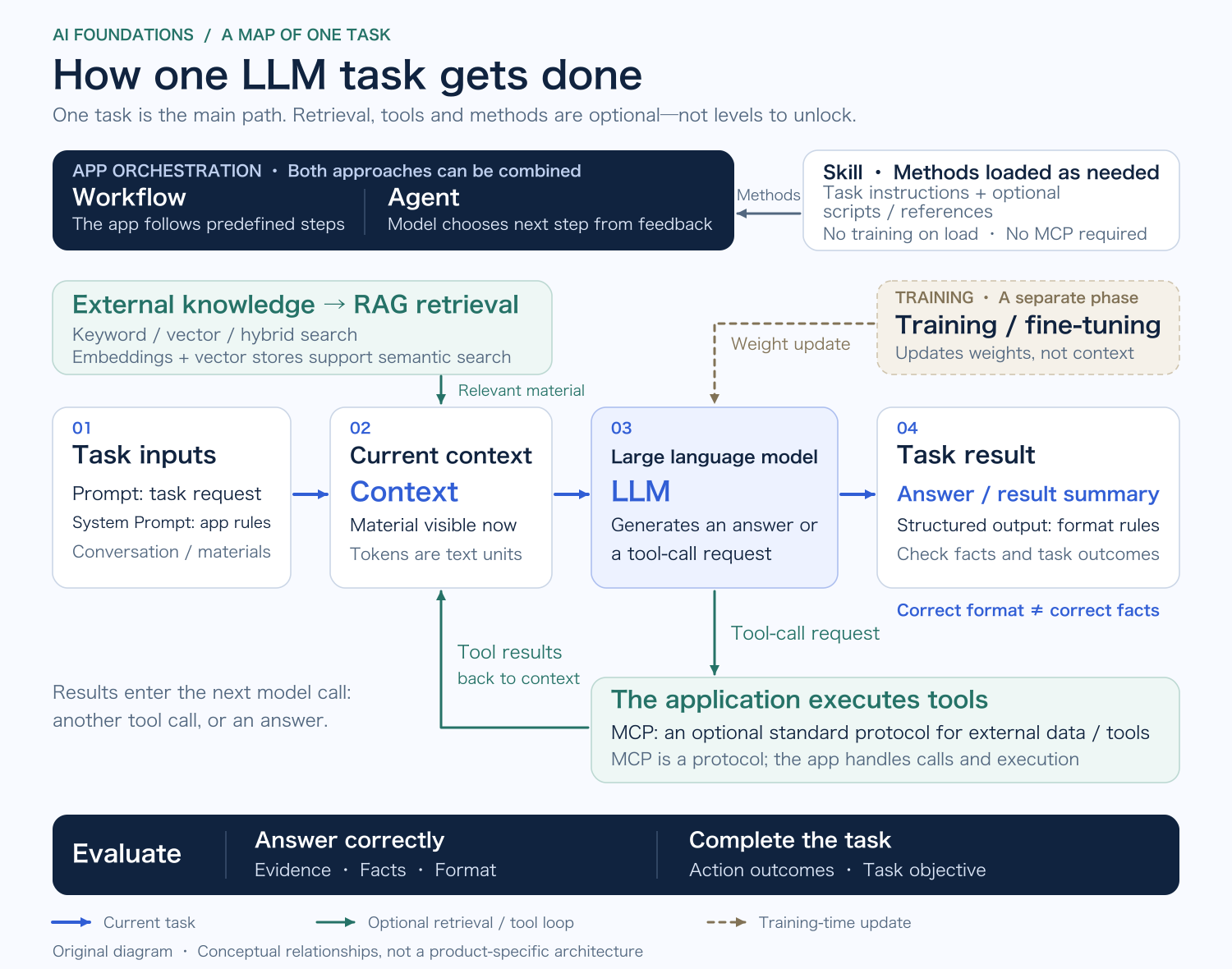
Writing a description takes language skills. Recommending an event requires this week's schedule. Checking availability means querying the registration system. The model, retrieval system and tools must work together. The opening diagram shows how; let's start with the description.
The language model: the part that generates
The library supplies the event information, and a large language model, or LLM, can help turn it into a description. Language models are one part of AI, which can also be used for image recognition, music recommendations and predicting equipment failures. This article focuses on language models and their applications. Some also accept images, audio and other inputs.
Think of the model as an editor and the AI product as the whole editorial office. The editor can write, but finding documents, verifying claims and contacting outside systems require other people and facilities. Search, file access and tools let the product do more than the model can accomplish by generating text alone.
Much of that model's ability comes from training. It contains many numerical values called parameters; adjusting them changes how it processes inputs. Pretraining uses many examples to learn patterns in language and knowledge. Subsequent training can improve instruction following and performance on particular tasks.
A common autoregressive language model calculates probabilities for the next token from the content so far, then generates incrementally according to a decoding strategy. Running a trained model to process an input and produce an output is called inference. Even generating a greeting counts: the term is broader than logical reasoning. Answering a question does not mean training the model again. [1]
To find out how well it writes, we need to try the task. Token-by-token generation alone cannot settle claims that it merely joins words or understands the world like a person. With this library assistant, we can begin with results we can inspect: is the description clear, and do its conclusions follow from the material?
Prompts, tokens, and context
Give an editor nothing more than “Write an event description,” and there is plenty to guess. Try “Write for parents bringing a child to the library for the first time; explain the age requirements and how to register,” and the audience and purpose become clearer. A model needs that guidance too. Questions, task instructions, examples and similar inputs are commonly called prompts.
The application can also use a system prompt to set a role and requirements, such as tone or what to do when information is missing. Whether the model follows them needs checking. Who may access which data, and which operations are allowed, also need permissions and validation in the application; a prompt alone cannot enforce them. [2]
An editor needs somewhere to lay out the material. Context is what the model actually receives in the current call: instructions, questions, the conversation history supplied, and possibly retrieved documents, tool descriptions and tool results.
What is on that desk is what the model can consult for this assignment. An application may save the entire conversation without putting every message back on the desk each time.
The amount of material is usually counted in tokens. Tokens are the units used after text passes through a tokenizer. One can correspond to a word, part of a word, a character or a fragment of encoded bytes. There is no one-to-one match with Chinese characters or English words. Accurate counts require the appropriate tokenizer or counting interface. [3][17]
The context window describes how much content a call can accommodate. Whether generated output shares that allowance depends on the model interface. Near the limit, an application may trim history, create a summary or return an error. Products do not all follow the same rule for automatic forgetting. [4]
A bigger desk holds more paper. It does not guarantee that the important facts will be easier to find. Organization, sources and purpose still matter. Long-term memory often follows a similar arrangement: save information outside the model, then bring it back into context when needed.
Hallucination: making an invention sound plausible
Now suppose the assistant has no schedule but confidently replies, “The children's reading group meets in the junior reading room at two on Saturday.” No such event is planned. A parent following that answer could make the trip for nothing.
This is a typical hallucination: a plausible response containing an error, invention or claim that conflicts with the supplied material. [5]
The checks are concrete: is the event actually scheduled, do the time and place match, and has the answer gone beyond what its material supports? A missing citation calls for verification; on its own, it does not establish that the model invented the claim.
A model may have learned how event announcements sound without knowing what this library has planned for the week. Training data, context and generation methods can all affect errors. It needs documents and query results, as well as room to answer “not found” or “not yet decided” when the information is insufficient.
RAG, embeddings, and vector search
So, start by finding the schedule.
The library can organize a collection of event material, find relevant entries when a question arrives, and have the model consult them before answering. This is retrieval-augmented generation, or RAG. Adding retrieved material to context does not itself update model parameters. [6]
In practice, documents are commonly organized into searchable passages with their title, date and source retained. The system finds candidates, may rerank them, and selects material to give the model. Retrieval determines what the model gets to read, so a wrong answer is also a reason to inspect the material it received.
Readers will not always use the words in the schedule. “Weekend activities for schoolchildren” may refer to an entry called “children's reading workshop.” The wording differs; the ideas are related.
Embeddings can help with this. In text retrieval, an embedding represents a passage as a numerical vector, allowing the system to compare a question with candidate material.
Think of the vectors as coordinates on a map. A suitable embedding model makes related material easier to locate. But those coordinates are learned representations: being close suggests relevance, not truth. [7]
A vector database, or a database with vector-search support, stores, indexes and queries the vectors. A new database may not be necessary. PostgreSQL, for instance, can gain vector-search capabilities through the pgvector extension. [8]
RAG is not limited to vectors, either. Keywords can be useful for exact event identifiers, dates and names. Semantic retrieval helps when wording differs but meaning is related. Combining the two produces hybrid retrieval. [6][7]
“Children's event cancellation notice” and “children's event schedule” may also be closely related. That extra word changes whether the parent should make the trip. After retrieval, the date, scope and meaning still need to be read carefully. The source must be reliable, and the answer must reflect what it actually says.
Fine-tuning: changing the model through training
The assistant keeps getting things wrong. Would more training help?
Start with the mistake. A schedule that changes every week needs timely updates and accurate queries. If all the information is available and the model still struggles with the same kind of task, we can adjust prompts and examples before considering fine-tuning.
Fine-tuning continues training an existing model to adapt it to particular tasks or data. Some methods adjust existing parameters; others train a small set of added parameters. It can affect style, task capabilities and domain knowledge, not just imitate a tone of voice. [9][18]
In the editorial-office analogy, RAG gives the editor reference material for this assignment. Fine-tuning resembles practice that changes how the editor handles a class of work. Both can be used together: a model can receive targeted training and continue to retrieve current information. [6]
Fine-tuning on an event table will not produce a continuously updated register. The model still needs to receive schedule changes through updated documents or queries.
Tool calling and structured output
We have found the schedule. The reader asks the next question: “Are there any places left?”
Reading a document is no longer enough. Availability changes and needs a query to the registration system. The application can give the model a tool for checking places, explaining what it does and which parameters it requires. The model requests a call; the application or runtime carries it out and returns the result.
This is commonly called tool calling. Requests expressed through function names and arguments are also often called function calling. Names vary across platforms. The distinction to keep clear is who requests the operation and who executes it. [10]
An editor asking someone to check availability needs to wait for that person to query the system and bring back a result. The query might fail, return old data or find a different event with the same name. Any of those would affect the answer.
The result may also need to go to another program. A person can read a paragraph; software may need fields for event name, date, age range and remaining places. Structured output makes those results easier for software to read. Mechanisms such as JSON Schema can specify fields, data types and required values more explicitly than a request to “please output JSON.” [11]
A correctly formatted response can still contain the wrong information. A valid form may say Sunday instead of Saturday, or give an integer for availability without any query to the registration system. Alongside field checks, compare the content with the actual query result.
Workflows and agents: who decides the next step?
Reading the schedule, writing an introduction, checking required fields and saving the draft can all be arranged in advance as a workflow. A workflow can contain conditional branches, retries and loops. Its defining feature here is that the program specifies the paths ahead of time.
If the query finds the event full, the model could instead be asked to decide whether to look for alternatives and what other requirements it needs to establish.
In LLM applications, a system that lets the model dynamically direct its execution path and choose tools within goals and constraints is commonly called an agent. It observes the result, then decides whether to retrieve more, call a tool, answer or request clarification. [12]
A workflow suits tasks whose steps are clear. When circumstances vary, the model can make more of the decisions. The two can also work together: an outer program prescribes which facts must be checked, and the model chooses how to find them. To tell whether a system is an agent, look at which decisions it delegates to the model. Several steps or a loop are not enough.
Delegation also needs stopping conditions. If a query returns nothing, should the system try again or ask a person to take over? Those limits need to be considered before it runs.
To check the work, we can inspect the sources, tool results and deliverable against the requirements. We do not need all the model's internal reasoning. Its plan says what it intended to do; its execution record shows what it did.
MCP and Skills: connections and working manuals
As the registration system, document collection and other services multiply, maintaining a separate integration for each becomes more work. MCP addresses part of that connection problem.
The Model Context Protocol, or MCP, is an open protocol through which AI applications connect with external tools and data resources. Supporting clients and servers follow shared conventions to exchange information about tools, resources and related capabilities. [13]
A common interface reduces some repeated integration work. What a tool can do and who may use it remain responsibilities of the application and server. Function calling concerns how the model requests an operation. MCP concerns how the application connects and exchanges relevant information. An application can also call its own API directly without MCP.
Connected tools still need instructions for the work. Here, a Skill means a package using the Agent Skills open format. Its core is a SKILL.md instruction file, with optional scripts, templates and reference material, loaded as needed by a supporting application. [14]
It is an editorial handbook: what an event announcement needs, which facts to check, and when to run a checking script. Reading that handbook does not itself update model weights or start another agent.
A Skill can use tools exposed through MCP, call other tools or simply provide a writing method. They can cooperate or be used separately; they are not layers that must always be built one on top of the other.
Evaluation: trace one error through the system
Even with the model, documents and tools connected, the answer can still be wrong.
Return to the cancelled event. Suppose the assistant still recommends it. Staring at the final sentence will not tell us what to change. We need to find out what it received along the way.
If the collection holds only an old schedule, fix the update process. If a cancellation notice exists but was not retrieved, examine retrieval. If a clear cancellation notice reached the context and the answer still recommends the event, check whether the model missed it, the instructions caused confusion, or later processing dropped the information.
The same wrong answer can come from different parts of the system. A different model or a longer prompt may happen to give a correct answer once without fixing the cause. Use the opening diagram to trace which material reached the model and what the tools returned. That helps locate what needs changing.
Keep the event material, the reader's question and the expected answer, and we have a repeatable check. Add a clear schedule, outdated information, different wording and questions the available material cannot answer. Gradually, that becomes an evaluation set. Evaluation, often shortened to eval, needs inputs and success criteria. It can also inspect tool calls and actual outcomes in external systems. [15]
A cancelled event should no longer be recommended. An absent age restriction should remain unknown. An availability query should match the correct event and time. After changing retrieval, prompts or models, reuse the questions and see whether the location of the error changes. The set can start small, provided we know what it checks.
Start with one schedule query, ask for a source and check the result yourself. Connect the registration system once that step is reliable. The reader is still asking, “Are there any places left?” If the answer is wrong, you now have somewhere to start looking: the documents, the model or the query.
Additional notes
Sources & further reading
- Hugging Face · How do Transformers work?
Language modeling, pretraining, transfer learning, and generation.
- Anthropic · Prompting best practices
System roles, clear instructions, and relevant context.
- Google · Introduction to Large Language Models
Tokens, output probabilities, and generation.
- Anthropic · Context windows
Current context, capacity, compaction, and overflow behavior; handling depends on the interface and application.
- Anthropic · Reduce hallucinations
Grounding, uncertainty, and the limits of hallucination mitigation.
- Lewis et al. · Retrieval-Augmented Generation for Knowledge-Intensive NLP Tasks
Original paper: §2.4 combines RAG with fine-tuning, §4.5 examines BM25, and Broader Impact discusses imperfect external sources.
- Anthropic · Contextual Retrieval
Chunking, embeddings, vector retrieval, and hybrid retrieval with BM25.
- pgvector · Vector similarity search for Postgres
An extension supporting vector storage and similarity search within PostgreSQL.
- Google · Fine-tuning, distillation, and prompt engineering
Fine-tuning, task data, and parameter-efficient approaches; distillation is outside this article’s scope.
- Anthropic · How tool use works
The model requests a tool operation; a client application or hosted server executes it and returns the result.
- Anthropic · Structured outputs
Schema constraints for response formats and tool parameters.
- Anthropic · Building effective agents
Architectural distinction between predefined paths and dynamic model decisions, with real feedback and stopping conditions.
- Model Context Protocol · Introduction
A protocol connecting applications to external systems; clients and servers must support the relevant capabilities.
- Agent Skills · Overview
An open format for task instructions, optional resources, and on-demand loading.
- Anthropic · Demystifying evals for AI agents
Tasks, grading criteria, execution records, and final outcomes in the environment.
- 卡码笔记 · 大模型关键词全解
The requested reading starting point: common terms in LLM applications.
- Hugging Face · Tokenization algorithms
Tokenization methods, including byte-level BPE and tokens representing byte fragments.
- Hugging Face PEFT · LoRA
An example of fine-tuning by freezing existing weights and training additional parameters.
From understanding AI to making a judgment.
Read in order, or start with the question on your mind.
- Understand AI
Connect the basics: models, prompts, and agents.
AI Basics: Inside a Library Assistant
- Frame the task
Clarify the purpose, the material, and the decisions that need you.
Handing Work to AI Starts with Understanding the Task
- Judge the result
When answers come faster, consider verification, choices, and responsibility.
When Answers Arrive Faster, Does Work Get Easier?